
GPS validation on clock in/out
Configurable location radius per tenant. EVV event records caregiver coordinates and the patient address geofence at the time of the event.
Scheduling & EVV
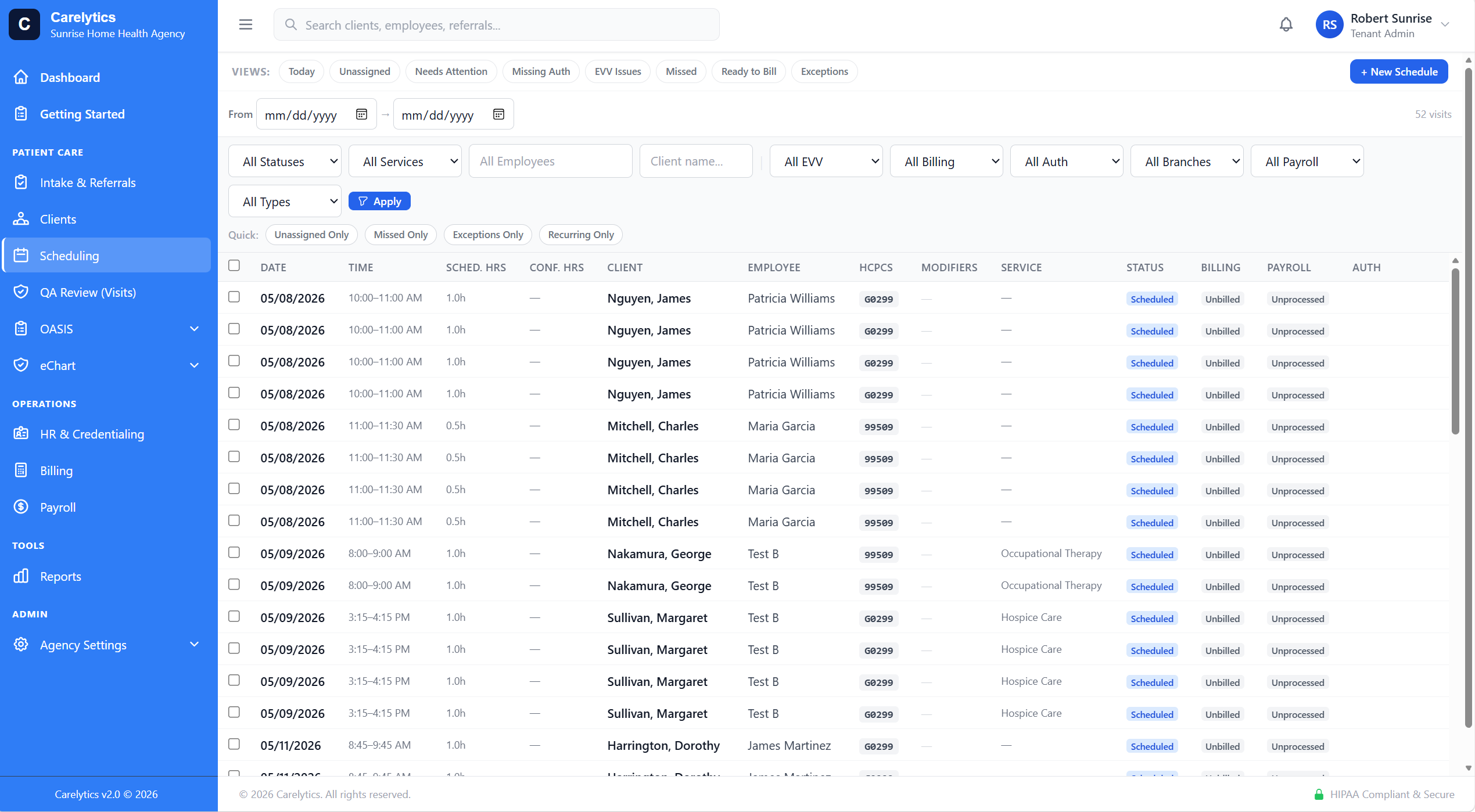
FullCalendar with drag-create. Recurring visits. Overnight-aware conflict detection. Multi-state EVV with per-state midnight boundaries. Manual entry for clock-failure recovery. Unscheduled visit flow that creates the visit and routes to the chart in one click.
Overnight shifts
Most platforms force a midnight split — caregiver clocks in at 10pm, "ends" the visit at 11:59pm, starts a new one at 00:00, clocks out at 6am. That's two visits on the calendar, two payroll entries, two opportunities for the caregiver to forget step three.
Carelytics handles overnight shifts as a single visit. The system auto-splits at midnight only when exporting to billing claims and EVV state aggregators — invisible to the caregiver.
EVV
Configurable location radius per tenant. EVV event records caregiver coordinates and the patient address geofence at the time of the event.
Late check-in, early check-out, minimum visit duration percentage, location radius — all configurable per tenant. Multi-state agencies can set per-state values.
EVV mismatches surface in an exception queue with the original event log, the visit context, and a route-to-fix link. Catch issues before they impact billing or payroll.
For clock-failure recovery only — phone died, bad GPS, app crashed. Supervisor backdates the EVV with a required reason. The "Manual" flag follows the record forever.
For visits that were never on the calendar (PRN, emergency). Creates a Visit and opens the chart in one click. PRN visits don't replace EVV — they require the same event chain.
State EVV aggregator exports honor the per-state midnight boundary, the per-state EVV format, and the per-state caregiver/patient ID schemas.
State EVV submission & compliance
Capturing a clock-in is the easy part. The hard part is getting every visit accepted by your state's aggregator — the right program, the right member, the right time — and knowing, in one place, which visits are stuck and why. Carelytic submits, routes, retries, and keeps score. All major aggregators are supported; your state's pipeline ships pre-configured.
When a visit completes it's submitted to the state aggregator (for example HHAeXchange for Minnesota DHS) — caregiver synced first, visit posted, status polled — with the right dates converted to the state's declared timezone so recent visits aren't rejected as "in the future."
Most waiver recipients are in managed care. Carelytic routes each visit to the member's MCO payer when it should, and to the fee-for-service program when it shouldn't — driven by the state's own service-scope list, so the right program ID rides on every submission.
A filterable worklist of the visits the aggregator actually rejected, grouped by cause, counted by visit (a retry isn't a new failure). An accepted visit drops off; a member-not-found triggers automatic discovery and retry rather than a dead end.
Fix a clock time after the aggregator already accepted the visit and Carelytic pushes the correction through as a real update — the record at the state matches the record in your chart, no manual re-entry in a second portal.
Your EVV compliance percentage, counted on delivered visits — not submission attempts — with a self-diagnosing by-procedure (HCPCS) panel that tells you exactly which codes are in scope and which aren't. The number a state reviewer will ask for, on screen.
A rejection digest classifies and routes every rejection to email — grouped by patient and cause for the agency, by code for the platform — so a stuck visit gets attention before it becomes a compliance-threshold problem.
State EVV is single-state per tenant today, pre-configured for your state during onboarding — the adapter pattern lets a new state's aggregator drop in without touching tenant data.
Caregiver self-service
Field staff and office staff get different dashboards on the same login. HIPAA-hygiene by default — caregivers don't see revenue, KPIs, or other patients' visit history that aren't theirs to see.
Routed by clients.view_assigned_only — clinical_nurse and therapist roles get field-staff by default.
Mobile EVV
Field clinicians don't sit at a desk. The Carelytic mobile EVV experience is a real PWA — installed to the home screen, working offline when reception drops, and shaped like a phone app, not a desktop product crammed into a webview.
Add to Home Screen on iPhone, install on Android. Standalone shell, no browser chrome, real app icon. Per-platform install affordances guide caregivers through the one-time setup.
Lost reception mid-visit? Clock-in, clock-out, signature, and note all queue locally and sync the second the phone reconnects. Idempotent — re-syncing never double-submits.
Tap the mic, talk through the note, sign. Clinicians document at the bedside instead of typing in the car between visits. Native browser speech recognition — no extra app.
On-screen canvas signature for patient + caregiver. Touch + stylus, idempotent on save, stored in the visit record. Re-signs replace cleanly without orphaning EVV state.
Visit-to-visit distance from clock-in coordinates. Pre-filled on the time sheet, editable if the caregiver took a detour. No more end-of-week mileage reconstruction.
Day-grouped visit cards, swipe-to-act (check in / document / mark missed), pull-to-refresh, relative-time labels ("in 30 min"), one-tap dial + maps to the patient. Designed for a thumb at the curb between visits.